

Every project, visible before it slips.
Zoho Projects keeps the plan, the work, and the hours in one system (Gantt charts with dependencies, task boards, timesheets, budgets, and issue tracking) and passes approved time to Zoho Books to invoice. Where a project stands stops being a question for the Monday meeting.
Try Zoho Projects
Free for up to five users. The implementation comes after.
Start a free trial →Have us implement it
Templates, timesheets, and billing set up by a Zoho Advanced Partner.
Talk to us →One place for the plan, the hours, and the budget.
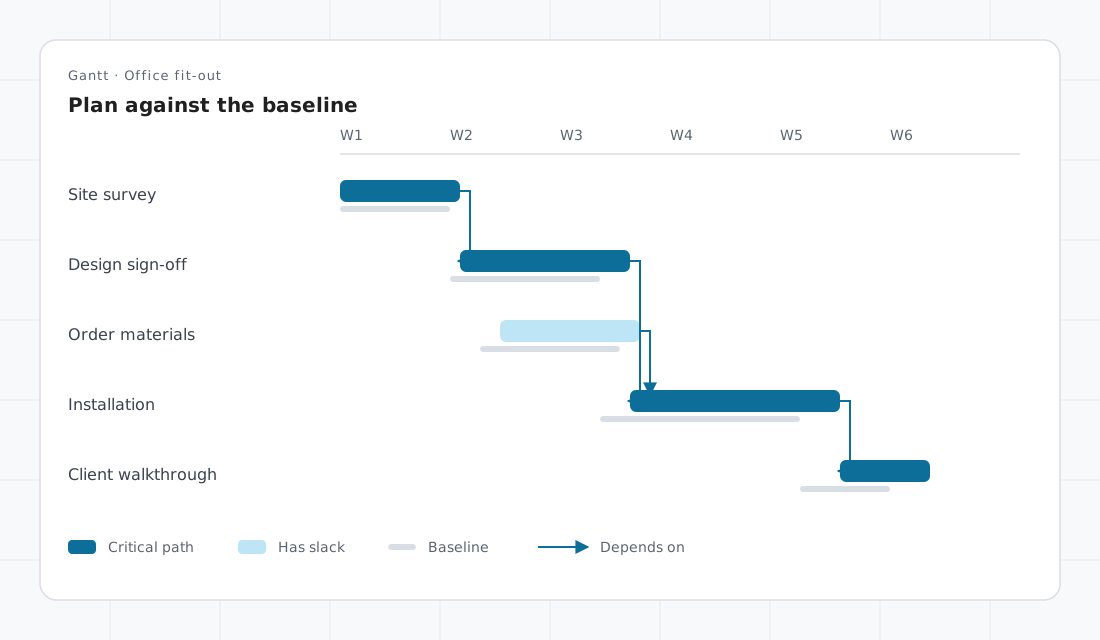
- Plans on a Gantt chart with task dependencies. On Enterprise, the critical path and baselines show the slip against the plan you started with.
- Tasks as lists or Kanban boards, with subtasks, recurring tasks, reminders, and statuses named the way your team works.
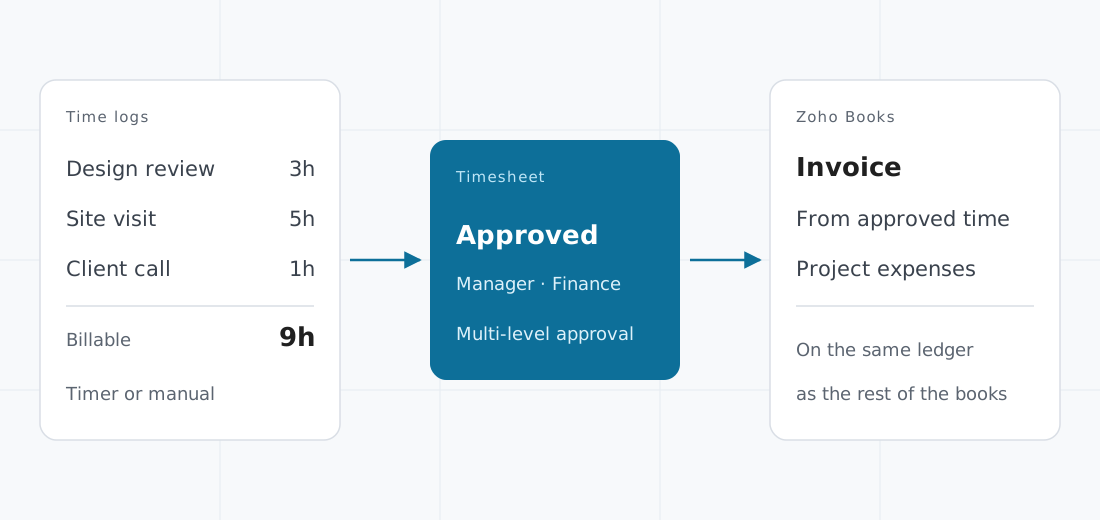
- Time logged by timer or by hand, billable and non-billable, approved on timesheets, at more than one level where finance needs to see it before it is billed.
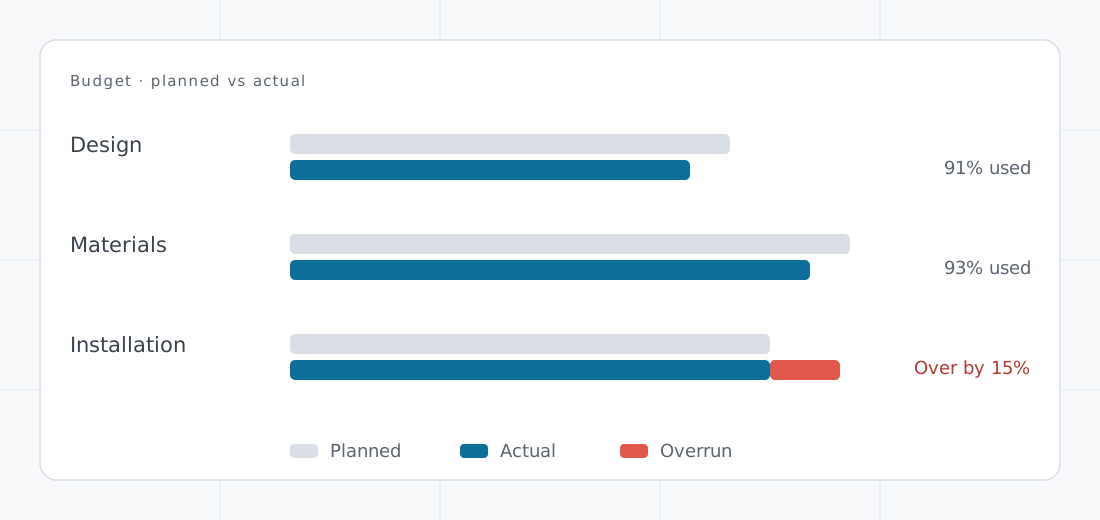
- Project budgets with planned against actual cost, so an overrun shows while it can still be acted on.
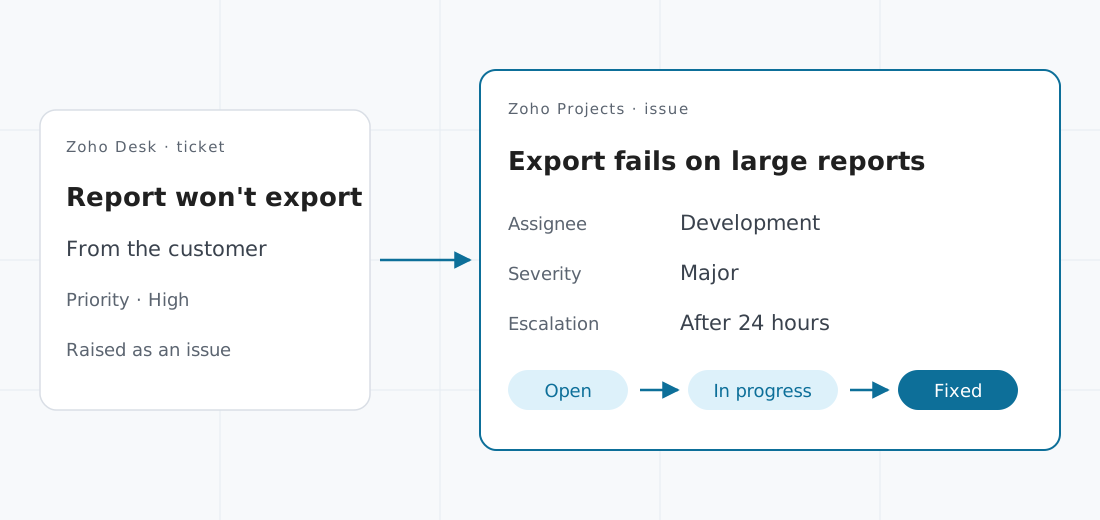
- Issue tracking with escalation rules, and Zoho Desk tickets raised straight into the project as issues.
- Custom fields, modules, and Blueprint workflows for work no template anticipated, with automation for the routine steps in between.
- Client users, so the people you deliver for follow their project in the same system, with the access you allow.
From the hour logged to the invoice sent.
Time to invoice
Approved hours become the invoice in Zoho Books.
Budget
Planned against actual, phase by phase.
Issues
A customer's ticket reaches the team that fixes it.
One platform, set up for how your work is delivered.
The client engagement
Scope set out as phases, hours logged against the tasks they were spent on, and approved time invoiced through Zoho Books. For the consultancy or agency whose margin is in the timesheet.
The schedule that cannot slip
Dependencies, the critical path, and baselines for installation, fit-out, and construction work, where one late delivery moves everything after it.
The internal programme
A system rollout or a product launch run as a portfolio, with issues tracked to resolution and Zoho Sprints alongside for the teams that work in sprints.
What we settle first.
A project system is only as good as the structure it gives each project. These are the questions we answer before the first one is opened.
- The structure. Phases, task lists, statuses, and templates, agreed once, so each new project starts the same way and the reports compare like with like.
- The hours. Who logs time, against what, and who approves it. Timesheets and budgets begin on Premium; if the hours are invoiced, we connect Zoho Books so they are billed from the approved timesheet, not retyped.
- The edition. Free covers five users and three projects. The critical path, baselines, single sign-on, and the portfolio dashboard begin on Enterprise; resource planning is an add-on there, and included on Ultimate.
- The outside view. Enterprise includes ten read-only users and Ultimate a hundred: enough for stakeholders who need to see progress without being licensed to change it.
- What you already own. Zoho Projects is part of Zoho One. If you are already licensed for it, the work is configuration, not another purchase, and we will say so.
Priced per user, from free.
Zoho's Malaysian pricing for Zoho Projects, per user per month, as published. The licence is the smaller number. We quote for the structure that makes each project report the same way.
Free
For a small team running its first few projects in one place.
Free for as long as you stay on it.
- 3 projects, with subtasks and a whiteboard
- 5 GB of storage
- iOS and Android apps
- 50 workflow actions a month
- Google Workspace and Office 365 integration
- Zoho MCP server
Premium
For the team that bills its time and needs to see its budget.
Billed yearly · RM20 when billed monthly.
- Everything in Free
- Unlimited projects; custom views and statuses
- Time logs and timesheets, with multi-level approval
- Project budgets and earned value
- Project custom modules and task Blueprint
- Recurring tasks and reminders; 5,000 workflow actions a month
- Zia, Zoho's AI assistant
Enterprise
For the business running several projects that compete for the same people.
Billed yearly · RM40 when billed monthly.
- Everything in Premium
- Critical path and baselines; portfolio dashboard
- Custom profiles, roles, and fields; global custom modules
- Single sign-on and two-factor authentication
- 10 read-only users; resources as an add-on
- Sandbox, custom domain, and Power BI integration
- 50,000 workflow actions a month
Ultimate
For the organisation planning people and time across every project at once.
Billed yearly · RM60 when billed monthly.
- Everything in Enterprise
- 100 resources and 100 read-only users
- Multi-user and multi-project timesheets
- Unlimited custom dashboards
- 15 GB of storage per user, 150 GB at minimum
- 500,000 workflow actions a month
Zoho's published prices for Malaysia, read 16 October 2026; Zoho may revise them. SST is charged on top. Every paid plan carries a 15-day trial, with no card required. We quote implementation separately.
Where it sits.
Zoho Projects suits a business that delivers its work as projects and tracks their status in a spreadsheet, a chat group, and whoever happens to remember.
It pairs with Zoho Books to invoice time and record project expenses, with Zoho CRM Plus or Bigin so the client and the deal sit beside the project, and with Zoho Desk so customer issues reach the people who fix them. On Zoho One, it is already in the licence.
Where we deploy it.
The software is the licence. The system is the work.
Zoho builds the platform. We build what your business runs on it — diagnosed, designed, implemented, and supported for as long as you run it. How we work → Ongoing support →
Tell us how a project runs today.
Walk us through one recent project, from plan to invoice. We'll show where Zoho Projects fits.